
Last updated: August 7, 2026
The best sleep app for night shift workers is one that understands your schedule is not 9-to-5. For comprehensive, science-backed sleep and light scheduling, Timeshifter is our top choice. For those on frequently changing schedules, SleepSync offers personalized plans based on your exact roster.
Most sleep apps are built for a world that sleeps at night. They assume you have a consistent bedtime, get anxious if you’re awake past 10 p.m., and want to wake up with the sun. For the millions of people who work nights, rotating shifts, or irregular hours, this advice isn’t just unhelpful, it’s irrelevant. Finding the best sleep apps for night shift workers means looking past the mainstream options and focusing on tools designed for the demands of your schedule.
The right app can help you plan your sleep around a chaotic roster, figure out when to nap, and create a wind-down routine that actually works in broad daylight. It’s about finding a tool that helps you get quality sleep, no matter what time it is.
Key Takeaways
- Shift-Awareness is Key: The best apps let you input your work schedule and provide sleep recommendations based on your specific shifts, not a generic 8-hour night.
- Circadian Science Matters: Tools like Timeshifter and SleepSync use principles of circadian biology to help you manage light exposure, caffeine intake, and sleep timing for better alertness and rest.
- One Size Does Not Fit All: The best app for a nurse on a rotating schedule may differ from the best app for a long-haul truck driver on a fixed night route. Your primary sleep challenge, be it falling asleep, waking up, or planning, should guide your choice.
- Free vs. Paid: While some apps offer useful free features, the most powerful scheduling and personalization tools for shift work typically require a subscription.
- Beyond Tracking: While tracking sleep can be insightful, the most effective apps for shift workers focus on planning and actionable advice to help you build a better sleep routine.
Sleep App Comparison for Shift Workers
| App | Best For | iPhone/Android | Free Option | Main Shift-Worker Feature | Sleep Tracking | Shift Scheduling | Main Limitation |
|---|---|---|---|---|---|---|---|
| Timeshifter | Circadian Rhythm Management | Both | Limited trial | Personalized light/caffeine/sleep timing | No | Yes | Subscription required for full use |
| SleepSync | Rotating & Irregular Shifts | Both | No | Roster-based sleep scheduling | No | Yes | May not be publicly available yet |
| ShiftSleep | Detailed Sleep & Shift Analysis | iOS only | Limited trial | Sleep debt & circadian insights [2] | Yes | Yes | Only available on Apple devices |
| Drowze | Falling Asleep & Relaxation | iOS only | Basic features | Shift-aware audio & wind-down tools [4] | Yes | No | Limited scheduling features |
| SleepShift | Nurses & Healthcare Workers | iOS only | Limited trial | Optimal sleep window suggestions [3] | No | Yes | Only available on Apple devices |
| Sleep Cycle | Smart Alarm & General Tracking | Both | Yes | Smart alarm works for any sleep window | Yes | No | Not designed for shift work planning |
| ShiftCoach | Android Users | Android only | Yes | Fatigue tracking for shift workers [5] | No | Yes | Basic interface; Android only |
What Makes a Sleep App Useful for Night Shift Workers?
A good sleep app for a shift worker does more than just play rain sounds or track how much you toss and turn. It functions as a practical planning tool that respects your unique schedule and helps you build a sustainable routine for better recovery.
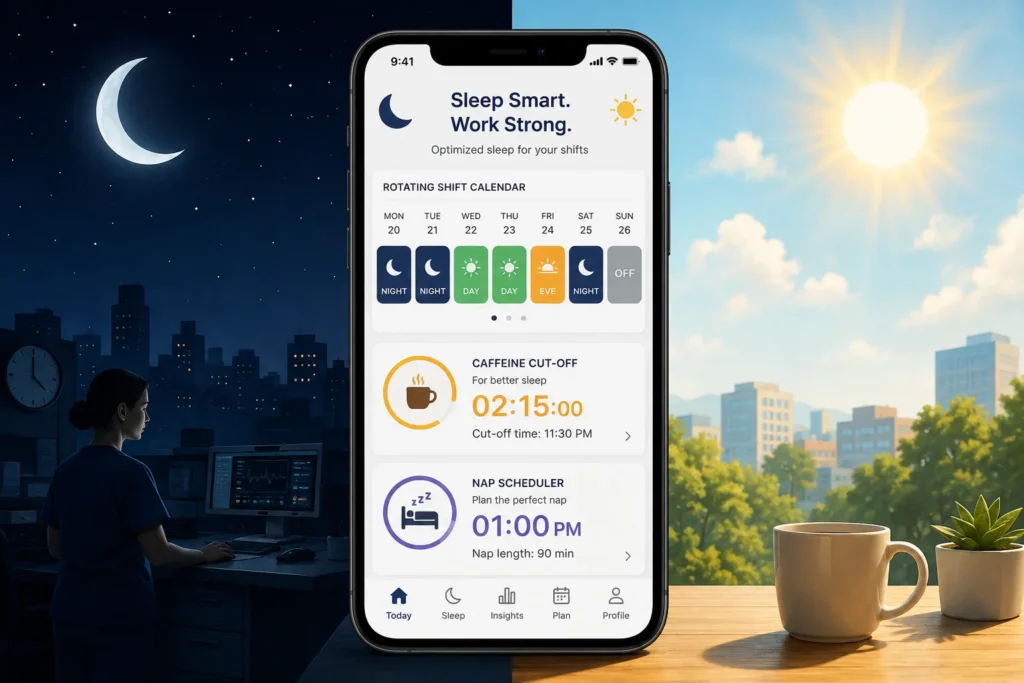
The most valuable features are those that offer practical guidance tailored to a non-traditional lifestyle. Look for apps that include:
- Shift & Schedule Awareness: The app should allow you to input your work roster, whether it’s fixed nights, rotating days and evenings, or a completely irregular schedule.
- Daytime Sleep Support: It must treat daytime sleep as your primary sleep period, with features like “dark mode” for the app interface and alarms that understand you’re not just taking a short nap.
- Personalized Sleep Timing: Instead of a generic “go to bed by 11 p.m.,” the app should recommend optimal sleep and wake windows based on your upcoming shift.
- Nap Planning: Napping is a critical recovery tool for many shift workers. A good app will help you schedule strategic naps to boost alertness without disrupting your main sleep period.
- Smart Alarms: An alarm that wakes you during a lighter phase of sleep can make getting up, especially after a short rest, feel much easier. This feature is useful regardless of what time you need to wake up.
- Circadian Guidance: Advanced apps provide advice on when to seek and avoid bright light to help your internal body clock adjust to your work schedule. This is one of the most powerful, science-backed strategies for improving daytime sleep and nighttime alertness.
- Caffeine Timing: Some apps offer recommendations on when to use and when to stop consuming caffeine to maximize alertness on the job without wrecking your sleep later.
The 7 Best Sleep Apps for Night Shift Workers
Choosing the right app depends entirely on the problem you’re trying to solve. Are you struggling to create a consistent routine? Do you need help falling asleep in the middle of the day? Or do you want data-driven insights into your sleep patterns? Here are our top picks for 2026.
1. Timeshifter: Best for Circadian Rhythm Management
- Best for: Anyone serious about using science-backed strategies to manage their internal body clock for better sleep and alertness.
- What it does: Timeshifter creates a personalized plan based on your sleep pattern, chronotype, and work schedule to help you manage the effects of shift work. It gives you precise, easy-to-follow advice on when to sleep, see light, avoid light, and use caffeine or melatonin.
- Why it may work for night shift workers: It’s one of the few apps built on actual circadian neuroscience. Instead of just tracking what you did, it tells you what to do next. The “Practicality Filter™” helps adapt the ideal scientific advice to your real-life constraints [1].
- Key features: Personalized circadian plans, light exposure timing, caffeine intake guidance, pre-shift adjustment plans.
- Platforms: iPhone & Android.
- Pricing: Offers a 30-day free trial. After that, a subscription is required, costing around $6.99/month or $69.99/year [1].
- What we like: The advice is actionable and based on solid science. It’s a proactive tool, not just a passive tracker.
- What we don’t like: It requires a subscription for ongoing use, and it doesn’t track your sleep automatically.
- Who should choose it: Shift workers who want a step-by-step plan for managing their energy and sleep and are willing to pay for expert guidance.
- Who should skip it: Those looking for a free app or a simple sleep tracker.
2. SleepSync: Best for Rotating & Irregular Shifts
- Best for: Workers with constantly changing schedules who need a clear, personalized sleep plan for each day.
- What it does: Developed by researchers at Monash University, SleepSync analyzes your work roster and routines to create a personalized sleep-wake schedule [7]. It aims to maximize your sleep and align your body clock with your demanding schedule.
- Why it may work for night shift workers: It was designed specifically for this purpose. A pilot trial found that shift workers using the app increased their nightly sleep by an average of 29 minutes [6]. The app also provides a “recovery score” to show how well you’re sticking to your optimal schedule [7].
- Key features: Roster-based scheduling, personalized sleep windows, recovery score.
- Platforms: iPhone & Android.
- Pricing: Availability and pricing may vary as it transitions from a research tool to a commercial app.
- What we like: It’s backed by scientific research and has been tested on actual shift workers with positive results.
- What we don’t like: It may not be widely available to the public yet. Its focus is on scheduling, not relaxation aids.
- Who should choose it: Anyone who can get access and wants a research-backed tool for managing a chaotic roster.
- Who should skip it: Those who need an app that is readily available on the app store today.
3. ShiftSleep: Best for Detailed Sleep & Shift Analysis
- Best for: iPhone users who want to track their sleep and see how it connects to their work schedule.
- What it does: ShiftSleep integrates your work calendar with your sleep tracking data. It helps you visualize your sleep debt, understand your circadian rhythm, and see trends in your sleep quality over time [2].
- Why it may work for night shift workers: It’s designed to recognize shift work patterns. By tracking both your work hours and your sleep, it can provide insights that generic sleep trackers miss, like how a string of night shifts impacts your overall sleep debt.
- Key features: Sleep tracking, shift analysis, sleep debt visualization, circadian rhythm insights, Apple HealthKit integration [2].
- Platforms: iPhone only.
- Pricing: Offers a 7-day free trial. Subscriptions are approximately $4.99/month, $39.99/year, or a $79.99 lifetime option [2].
- What we like: The integration of shift schedules and sleep data is powerful for identifying patterns.
- What we don’t like: It’s only available for iOS, and a subscription is needed for the most useful features.
- Who should choose it: Data-driven iPhone users who want to understand exactly how their job is affecting their sleep.
- Who should skip it: Android users or those who want proactive advice rather than retrospective data.
4. Drowze: Best for Falling Asleep & Relaxation
- Best for: Night shift workers who struggle to unwind and fall asleep, especially during the day.
- What it does: Drowze is an audio-focused app with soundscapes, guided meditations, and wind-down sessions designed to help you relax. Its “shift-aware” mode tailors content to your needs as a shift worker [4].
- Why it may work for night shift workers: Falling asleep in a bright, noisy world is a common challenge. Drowze provides tools to help you block out distractions and signal to your brain that it’s time to rest, even when the sun is up.
- Key features: Guided wind-down sessions, soundscapes, a shift-aware sleep mode. The Pro version adds a nap optimizer, sleep debt tracker, and caffeine coach [4].
- Platforms: iPhone only.
- Pricing: A free version with basic features is available. Drowze Pro costs about $4.99/month or $29.99/year [4].
- What we like: The focus on audio relaxation is a practical solution for a common problem. The nap optimizer is a great feature.
- What we don’t like: It’s iOS-only and less focused on complex schedule planning.
- Who should choose it: People whose main problem is quieting their mind and blocking out the world to fall asleep after a shift.
- Who should skip it: Android users or those who need a robust scheduling and circadian management tool.
5. SleepShift: Best for Nurses & Healthcare Workers
- Best for: Nurses and other healthcare professionals on rotating shifts who need simple, clear guidance.
- What it does: SleepShift is tailored for the demanding schedules of nurses and night workers. You input your shifts, and the app provides optimal sleep windows, wind-down reminders, and caffeine cutoff times [3].
- Why it may work for night shift workers: It’s built with the healthcare environment in mind, focusing on simplicity and actionable reminders that fit into a busy and stressful job.
- Key features: Optimal sleep window suggestions, wind-down reminders, caffeine timing [3].
- Platforms: iPhone only.
- Pricing: Requires a subscription, with UK pricing around £5.99/month or £34.99/year [3].
- What we like: The targeted approach for nurses is a great idea, as their schedules are notoriously difficult.
- What we don’t like: It’s another iOS-only app, and its feature set is more focused than comprehensive planning tools.
- Who should choose it: Nurses and healthcare workers using an iPhone who want straightforward, schedule-aware reminders.
- Who should skip it: Android users or workers outside of healthcare who may not find the experience as tailored.
6. Sleep Cycle: Best Free Option
- Best for: Anyone who wants to try a sleep tracker with a smart alarm without paying for a subscription.
- What it does: Sleep Cycle is one of the most popular sleep tracking apps. It uses your phone’s microphone or accelerometer to analyze your sleep stages and wakes you up during your lightest sleep phase within a predefined window.
- Why it may work for night shift workers: The smart alarm feature works no matter what time you go to bed. Waking up from light sleep can make it feel much easier to get out of bed, which is a big benefit when you’re sleeping against your natural body clock.
- Key features: Sleep analysis, smart alarm clock, detailed sleep statistics (in premium version).
- Platforms: iPhone & Android.
- Pricing: The core sleep tracking and smart alarm features are free. A premium subscription unlocks more advanced analytics and features.
- What we like: The smart alarm is a genuinely useful feature, and the free version is very functional.
- What we don’t like: It’s not designed for shift workers. It doesn’t offer any scheduling, planning, or circadian advice.
- Who should choose it: People who want to wake up feeling more refreshed and are looking for a free, simple sleep tracker.
- Who should skip it: Anyone who needs help planning their sleep around a work schedule.
7. ShiftCoach: Best for Android Users
- Best for: Android users looking for a simple, free app for sleep and fatigue planning.
- What it does: ShiftCoach is a straightforward app designed to help those with non-traditional work hours plan their sleep and track their fatigue levels [5].
- Why it may work for night shift workers: Many of the most advanced shift work apps are iOS-only. ShiftCoach provides a much-needed option for the Android ecosystem, focusing on the core problems of planning and fatigue.
- Key features: Shift-aware sleep planning, fatigue tracking [5].
- Platforms: Android only.
- Pricing: Currently free on the Google Play Store.
- What we like: It provides a dedicated solution for Android users, who are often left out.
- What we don’t like: The interface and feature set are more basic compared to the paid iOS options.
- Who should choose it: Android users who need a simple tool to start planning their sleep around their shifts.
- Who should skip it: iPhone users or those who want advanced features like circadian management and detailed analytics.
How to Choose the Right Sleep App for Your Shift Schedule
The “best” app is the one that solves your biggest problem. Don’t pay for a complex circadian planner if all you need is a better alarm clock. Use this guide to help you decide.

- If you work a fixed night shift: Your main challenge is reinforcing a consistent daytime sleep schedule. An app like Timeshifter can help you manage light exposure to make your routine more robust.
- If you work rotating shifts: Your body clock is constantly playing catch-up. A roster-aware app like SleepSync or ShiftSleep is essential for planning sleep around your changing schedule.
- If you have trouble falling asleep after work: Your mind might be racing, or your environment might be too stimulating. An app focused on relaxation like Drowze could be the most effective tool.
- If you always feel groggy when you wake up: The smart alarm in an app like Sleep Cycle could make a noticeable difference by waking you from a lighter sleep stage.
- If you rely on naps: Look for an app with a nap planner or optimizer, like the pro version of Drowze, to help you get the most restorative rest without interfering with your main sleep.
- If you want to understand your sleep patterns: A detailed tracker like ShiftSleep will give you the data you need to connect your work hours to your sleep quality.
Are Sleep Apps Actually Useful for Night Shift Workers?
A sleep app is a tool, not a cure. It cannot change the fundamental biological reality that humans are wired to be awake during the day and asleep at night. No app can eliminate the health challenges associated with long-term shift work.
However, a good app can be an incredibly useful tool for planning, behavior change, and routine building. By providing a structured plan, apps can help you make better decisions about when to sleep, nap, get light, and drink coffee. This structure can lead to more consistent, higher-quality sleep. Research supports this, with studies like the one on the SleepSync app showing users can get quantifiably more sleep by following a personalized schedule [6].
The most effective apps are those that empower you with practical, evidence-based strategies. They work best when used as one part of a larger sleep improvement plan that also includes optimizing your sleep environment and adopting healthy sleep habits.
What We Would Look For Before Paying for a Sleep App
Before committing to a subscription, ask yourself a few questions:
- Does it have a free trial? Always try before you buy. Use the trial period to see if you actually use the features and if they make a difference.
- Is it designed for shift work? Don’t pay for a generic sleep app. The premium features should be directly related to solving the problems of an irregular schedule.
- Is the advice personalized? The recommendations should change based on the schedule you input. If the advice is generic, it’s not worth paying for.
- Does it require a wearable? Some apps need a smartwatch for full functionality. Make sure you have a compatible device if one is required.
- What is the data privacy policy? You are sharing sensitive health information. Check that the company has a clear and responsible privacy policy.
Frequently Asked Questions
What is the best sleep app for night shift workers?
For most people, Timeshifter is the best choice because it provides proactive, science-based advice for managing your body clock. However, the best app depends on your specific needs, such as scheduling for rotating shifts (SleepSync) or relaxation aids (Drowze).
Is there a sleep app specifically for shift workers?
Yes, several apps are designed specifically for shift workers, including Timeshifter, SleepSync, ShiftSleep, SleepShift, and Drowze. These apps include features like roster integration and personalized sleep timing that generic apps lack.
What app helps with sleep after a night shift?
For help falling asleep, an app like Drowze is an excellent choice. It focuses on audio-based relaxation, with guided wind-downs and soundscapes to help you quiet your mind and block out daytime noise.
Can sleep apps help with rotating shifts?
Yes, apps that allow you to input your work roster, like SleepSync and ShiftSleep, are very helpful for managing rotating shifts. They provide tailored sleep schedules that adjust as your work hours change.
What is the best free sleep app for shift workers?
Sleep Cycle is the best free option. While it’s not designed for shift scheduling, its smart alarm feature is very effective for waking up more gently, which is a benefit for any shift worker. For Android users, ShiftCoach is a good free planning tool.
Are sleep tracking apps accurate?
Consumer sleep trackers are not medical devices and cannot diagnose sleep disorders. However, they can be quite good at estimating your total sleep time and identifying trends in your sleep patterns over time. Their accuracy for determining specific sleep stages (like deep or REM sleep) varies widely.
Should night shift workers use a sleep tracker?
Using a sleep tracker can be motivating and insightful. It can help you see how your work schedule impacts your sleep duration and consistency. However, focus on apps that offer actionable advice for planning your sleep, not just on the data itself.
Conclusion
Thriving as a night shift worker requires a deliberate approach to sleep and recovery. While no app can replace the fundamentals of a dark, quiet, and cool sleep environment, the right tool can provide the structure and guidance needed to build a better routine.
Instead of searching for a single “best” app, focus on the specific problem you need to solve. If your schedule is a mess, choose a planner like Timeshifter or SleepSync. If falling asleep is your biggest hurdle, try a relaxation-focused app like Drowze. And if you want to wake up feeling less groggy, the smart alarm in Sleep Cycle is a great place to start.
By choosing an app that aligns with your personal challenges, you can take a significant step toward better sleep, faster recovery, and more energy on any shift.